Update

The Twelfth Hour

I finished Chapter 12 (for now)! I knew I was going to modify the ending, but I still managed to shock myself with how much it changed. The subtle difference between killing a character and maybe killing a character can make a bigger difference than you’d think. In my second pass through the book, I’m currently on Chapter 6. We’ll see if I can finish this in the next two and a half weeks!

OokiiSoraCon

Two weeks ago, at the Chair of OokiiSoraCon’s request, I researched E-Commerce WordPress plugins for selling tickets for next year’s OokiiSoraCon. I came up with a pretty good solution that improves the somewhat confusing process we had last year. It should be up and running on the OokiiSoraCon website soon.

Miscellaneous

In other news, I helped the Port Polson Players overhaul the information on several pages of their website. I did a little work on The Writer’s Net, mostly ensuring that the user’s input is valid and won’t break the website. And I helped my brother revise several job applications.

Update

The Twelfth Hour

I’m in the last third of Chapter 12! I might, however, need to go through several of the sections throughout the chapter again because I don’t particularly like how I wrote one of the characters. I’ve found that if the main character doesn’t feel like he’s behaving correctly in a scene, I probably haven’t made him angry enough. Apparently, that applies to one of the supporting characters as well. XD

Shattered Soul

The other programmer on the tech demo for Team KAIZEN’s 3D fighter Shattered Soul recently implemented better hitboxes. I stepped in for a few hours last week to fix a few problems with them. You can check out the current version of the demo in this video on the AddATudez Twitch channel.

The Writer’s Net

Extra Life’s official fundraising event was on Saturday. This year, I decided to raise money with a three-day hackathon where I continued work on The Writer’s Net, a .NET/C# MVC website for building and distributing non-linear books. It includes a map interface very similar to Adventurous Reader‘s. I started this project half-a-year ago, worked on it frantically for a couple weeks, and then returned to working on Team KAIZEN’s Burst!. For my hackathon over the past few days, I picked it up again and finished implementing the map- and book-viewing portion of the website. It’s ugly and buggy as hell, but it basically works. I plan to continue cleaning it up since I’m taking a break from Burst! for personal reasons. That said, I hope to stream that work as well as whatever I do on Team KAIZEN’s projects regularly on my Twitch channel.

Update

The Twelfth Hour

I’m a third of the way through revising Chapter 12. Writing the middle of the chapter is going pretty slowly. I’m trying to find the balance between that final scene in Psycho that explains everything but everyone hates and explaining enough to satisfy the reader. Hopefully, the final third of the chapter where the big bad is defeated (or not DUN DUN DUUUUUN!) will go faster. In the meantime, I’m splitting my efforts between lightly editing the entire book again and continuing heavy revising of Chapter 12. On my second pass through the book, I’m currently at the beginning of Chapter 3.

The Cheeky Geeky Vaudeville

Last weekend was the annual Cheeky Geeky Vaudeville variety show. As always, I went down to Missoula to run lights and sound. We had a fun show overall! Next weekend, I’ll likely go back for the manager’s post-show meeting.

Burst!

I’ve spent the majority of my time and effort on The Twelfth Hour, so I haven’t done much here. I polished a few aspects of the new stages I built after our internal review and started working on rewriting the system for unlocking items. After implementing Asset Bundles and now requiring the ability to unlock stages, I’ve needed to rethink it a bit. You can see a preview of the new stages in the first fifteen minutes of this video on the AddATudez Twitch channel.

Update

The Twelfth Hour

I’m almost done revising the last section of Chapter 11. O.O If this goes well, I’ll finish that and the chapter review by Wednesday at the latest. I plan to finish Chapter 12 by October 31. Then, I’ll have about a month and a half to review the whole book again, modify the little details that have changed, and write synopses and pitches for beta readers.

Burst!

I spent the past three weeks creating new stages for Burst!, creating a Stage Select menu, and continuing to work with Asset Bundles. Burst! has two new stages in addition to the test level that you’ve seen since this version of the game was created. Team KAIZEN will reveal them during the Fall Brawl in Bozeman, MT October 27-28 where we’ll demo PlayStation VR and the latest builds of Burst! and Shattered Soul.

Twitch

Last Saturday, The Cheeky Geeky Vaudeville hosted a twelve-hour gaming event on Twitch to help raise funds for our upcoming show at The Roxy in Missoula, MT on October 13. I spent most of the day streaming Oddworld: Abe’s Exoddus and have continued to stream it throughout this past week. I’ll likely continue experimenting with Twitch next week with more Abe’s Exoddus and Skyrim. You can watch on my channel or the AddATudez channel 3-4 PM Pacific Time every day… At least, I did that last week. You can find the schedule on my channel.

Update

Team KAIZEN

The past couple weeks haven’t felt particularly productive, but I guess they were about as productive as usual. On Friday the 24th, Team KAIZEN was invited to demonstrate PlayStation VR, Burst!, and Shattered Soul at Sacred Heart Children’s Hospital’s 15th-anniversary bash. I spent the day petsitting so Josh, Trevor, and Cyndi could participate, but it was a good time all around. This week, after I took a quick trip to Montana to visit the Port Polson Players, I finished implementing basic Asset Bundles for Burst!’s music and song data and added a loading screen to both the game and the song editor. It was easier to implement that I thought actually. I also broke out the Task Manager. Memory management, baby! Next week, I’ll probably continue optimizing loading music assets and create Asset Bundles for levels and fireworks.

Writing

By tonight, I expect I’ll be a little less than halfway done with Chapter 11 (of 12!) of The Twelfth Hour. Hooray! So far this chapter hasn’t been as big a pain in the ass as Chapter 10 was. In related writing news, I got Final Fantasy XV: The Void Noctis Continued to Leave Behind published on the Extra Life Community website. Surprise! A year later, my Final Fantasy XV article is finally complete!

FirstGroup America

The day before the event at Sacred Heart, I got another freelance job at FirstGroup America. Despite having no experience making ASP.NET applications, I’m debugging an ASP.NET application. O.o I suppose I’m spending more time optimizing MS SQL queries, which I have more experience with, than working in ASP.NET, but still, vhat a twist! I’m glad I spent a couple weeks playing around with C#/.NET a few months ago. I probably wouldn’t have felt confident enough to do this without it. Also, it’s been more than two years since I’ve handled MS SQL queries timing out, but by god, I still recognize the symptoms and have a full toolbox of solutions! Overall, my experience at Agile Data Solutions came back to haunt me in multiple ways this week.

Final Fantasy XV: The Void Noctis Continued to Leave Behind

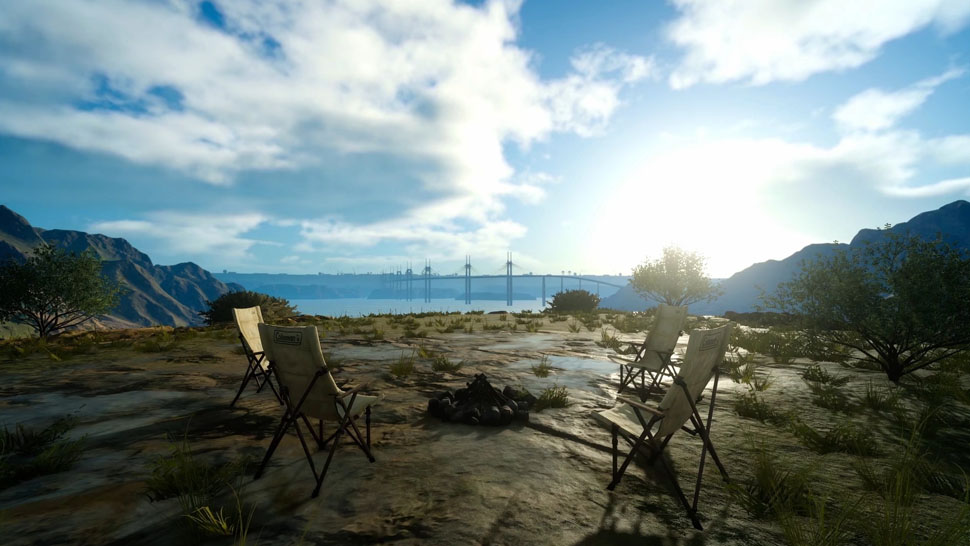
Empty Coleman Chairs

Last year, I claimed Kingsglaive: Final Fantasy XV failed to tell a coherent story without Noctis. Now I claim Final Fantasy XV failed to tell a coherent story because it didn’t include Noctis either.

Noctis’ physical presence fails to compensate for his mental and emotional distance from the game’s events. Despite his appearance, he primarily functions as a vessel for the player. Such protagonists serve many games well, but when the story’s world, characters, and purpose rely on the protagonist’s actions and personality rather than the player’s, his absence spells disaster. Final Fantasy XV has many intriguing ideas and great potential to tell a rich story, but Noctis’ emptiness riddles it with character arcs that go nowhere, contradictions, and confusion.

You can read the full article on the Extra Life Community website here.

For those of you who don’t know, Extra Life is like a marathon for charity, but instead of running or walking, you play video games to raise money for a children’s hospital of your choice. The official Extra Life event occurs November 3 this year, but you can raise money whenever you want year-round. Check out the Extra Life website to learn more, donate, and sign up!

Update

The Twelfth Hour

I finished Chapter 10 of 12! Then, I started reviewing Chapter 11. Finishing it will be crazy! All the plotlines and character arcs are smashing together into a glorious finale! …Or maybe into nonsense. Who knows? The due date for having the book beta reader ready is December 12, fitting considering the story ends on that day. If you’d like to get in on it, contact me!

Burst!

My brother got married last weekend, and we had family over. That consumed a lot of time, and what time I had left I decided to spend on The Twelfth Hour. I did, however, manage to finish fixing the screen resolution problems in Burst!, add Prima Nocta’s “Stones and Metal” to the playable songs, and fix some random problems with the gameplay before then. While I still have more to tweak, the CEO Josh showed the new build to kids at the company’s video game design camp last week. They were addicted to it! You can check out the latest build for yourself on the Add A Tudez Entertainment Twitch channel here. Next up, I’ll implement Asset Bundles, which, from what I’ve read, sound like my kind of tedious.

Website Stuff

I took some time this weekend to research and implement a new HTML retrieval solution to resurrect WikiNatural, and finally, a year later, the 3D web browser for Wikipedia has returned! You can play around with it here. I’ll likely write up an article on how I did it for this blog next week. Writing about these little web dev projects gives me an excuse to learn this stuff. 🙂 When I finish implementing Asset Bundles in Burst! and the Song Editor, they will likely become a topic as well. Also, the surprise article I sent to the Extra Life editor has gone through a couple revisions and will release soon.

How to Upload Content to a HostGator Subdomain

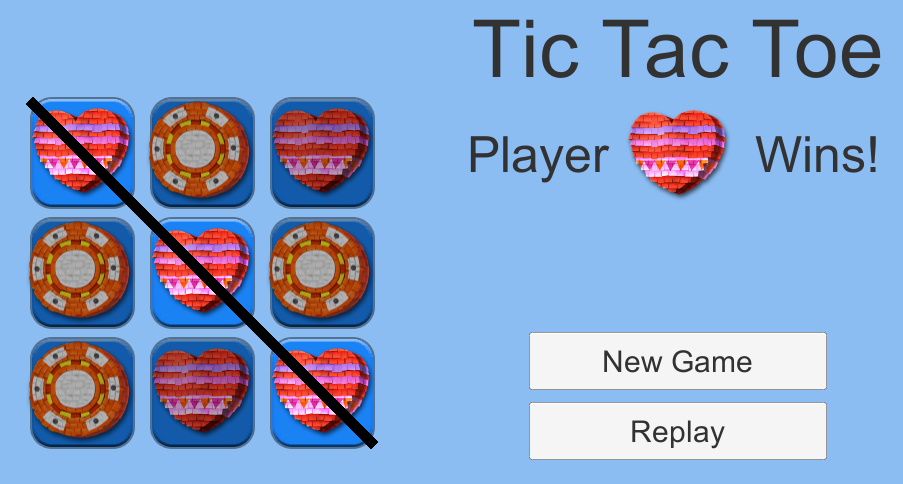
Tic Tac Toe Gameplay Image
Subdomains are subdivisions of a website’s primary domain. In the web address, the name of a subdomain appears before the domain name with a period separating them. For example, Extra Life’s domain is extra-life.org and the Extra Life Community website is a subdomain of Extra Life, community.extra-life.org. Subdomains are themselves websites. They can host WordPress sites, forums, wikis, custom HTML, games… Pretty much anything the main domain can host, a subdomain can as well.

If you already have a website hosted through HostGator, you can have as many subdomains as you want. How do you create a subdomain though, and how do you upload custom content to it? This guide will walk you through how to host a Unity 3D or RPG Maker MV project on a subdomain of your HostGator-hosted website, but steps 2 and 3 apply to any custom HTML you want to host. If the game stuff doesn’t apply to you, skip to there. Otherwise, read on! This tutorial assumes you are using a Windows machine, but the steps are similar for other platforms.

Step 1: Build your game

If you’d like to host a game you’ve built on a subdomain of your website and you haven’t built the game for the web yet, obviously, you’ll need to do that. 🙂 Below are basic instructions for Unity 2018 and RPG Maker MV.

Unity 2018

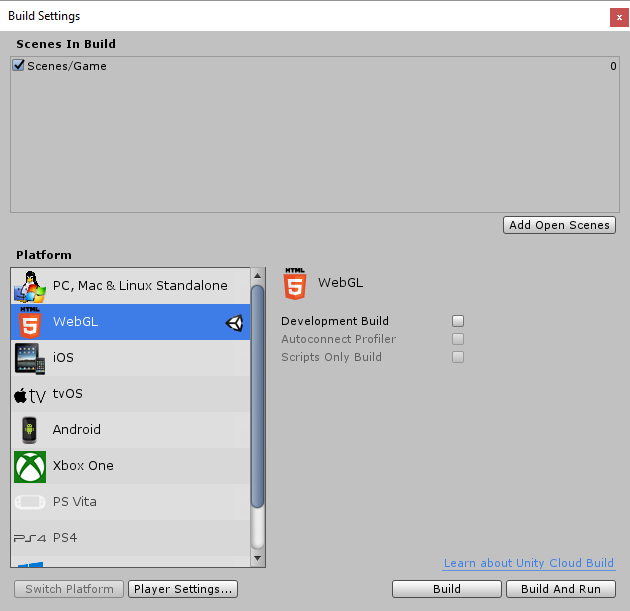
In Unity, open the File menu and select Build Settings…
Unity Build Settings

In the following window, check the scenes to include in the build and select WebGL as the Platform. You can find more settings by clicking the Project Settings… button. This article on Unity’s website has more information about these settings, the build process, and its products.

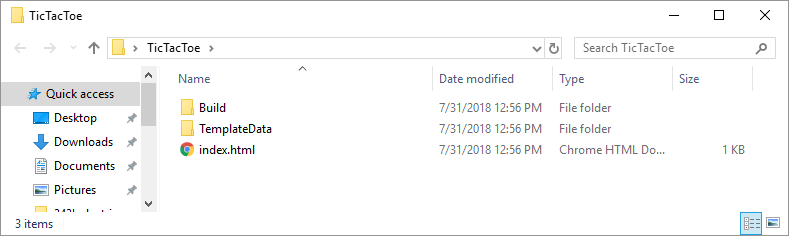
When you’re satisfied, click Build. Note that if you don’t have WebGL support installed, you will be prompted to install it. Otherwise, you’ll then select a folder to save the game files in. Unity will build the game and save two folders and an index.html file to your selected location.
Unity Web Build Products

You can test the game by opening the index.html file in a web browser. If you use Chrome, it typically doesn’t like accessing local files and will likely display an error message. You might want to use Firefox or another browser instead.

RPG Maker MV

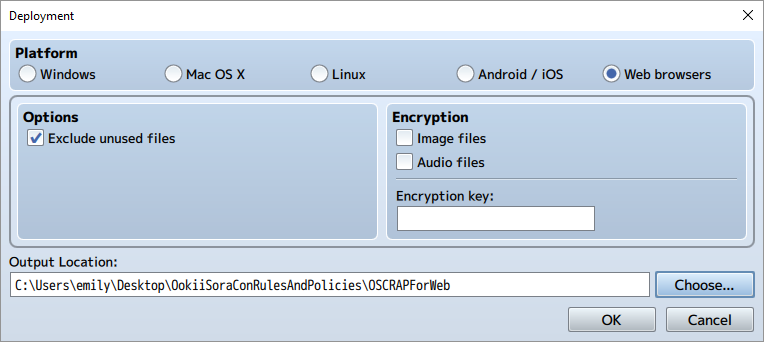
In RPG Maker MV, open the File menu and select Deployment…
RPG Maker MV Deployment Options

In the following window, check “Web browsers” from the Platform radio buttons and select an Output Folder. I also recommend checking the “Exclude unused files” option. If desired, you can also select to encrypt your Image or Audio files. When you’re done, click OK.

Within the location you selected, RPG Maker will produce an index.html file and several folders of assets. If you’ve added any extra folders to your RPG Maker project, these will also be copied automatically. I, for instance, had a folder where I saved json files produced by the Character Generator and a folder of Photoshop files for custom image assets. Feel free to delete these extra folders if they aren’t required for your game to run.
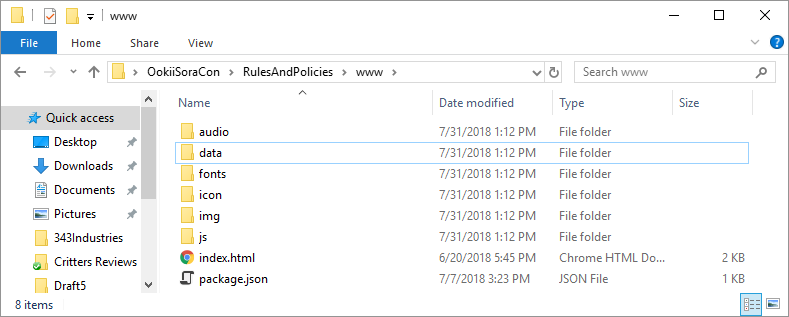
RPG Maker MV Web Build Products

You can test the game by opening the index.html file in a web browser. If you use Chrome, it typically doesn’t like accessing local files and will likely display an error message. You might want to use Firefox or another browser instead.

Step 2: Create a Subdomain

If you don’t have a subdomain for your project already, you’ll need to create one. You can do this within your website’s cPanel.
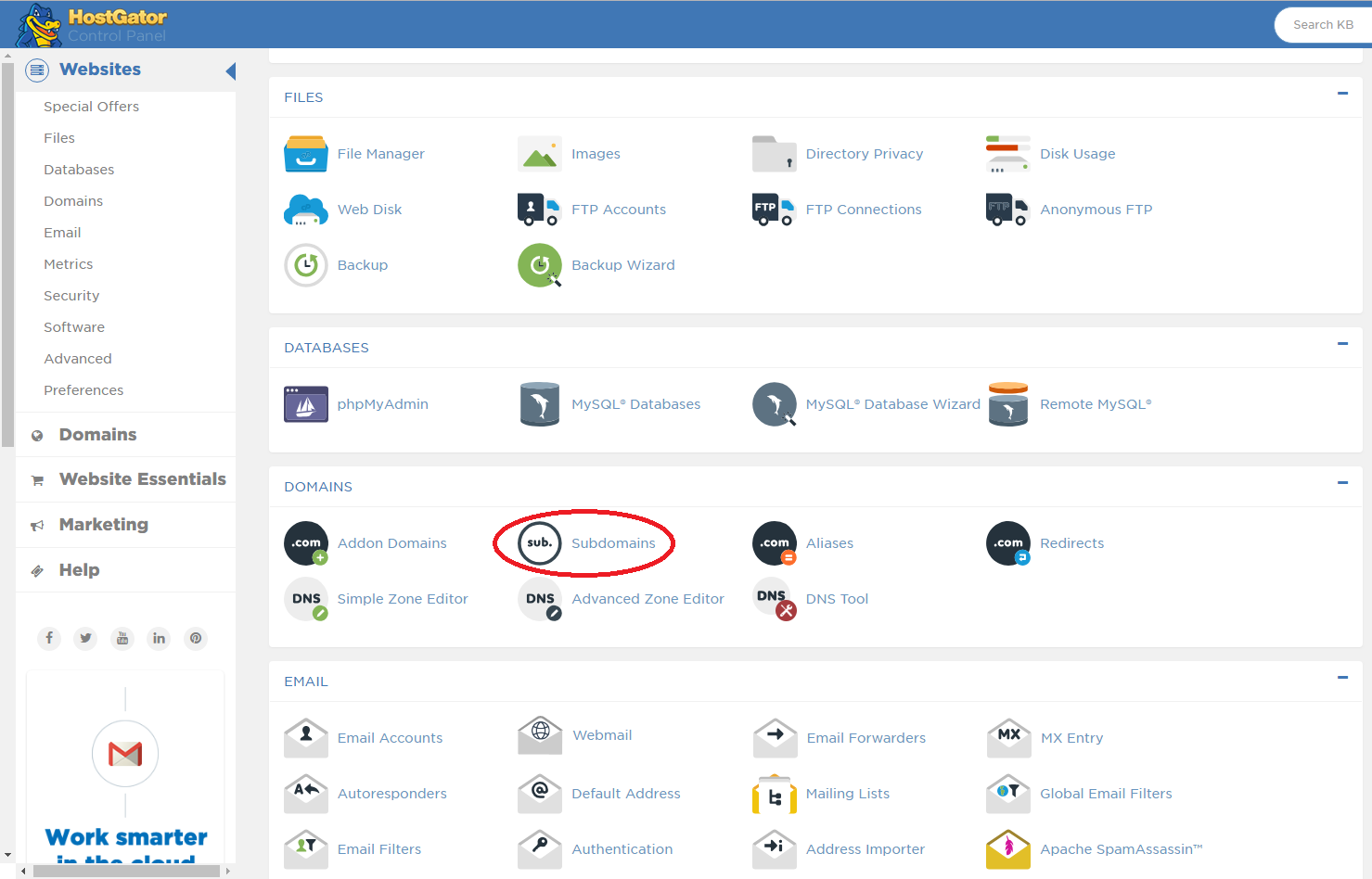
cPanel Subdomains

Step 2a: Login to cPanel

HostGator will have sent you an email with instructions on how to access cPanel when you purchased your domain and hosting service. Since I use shared web hosting, I log in to cPanel by navigating to a web address that looks something like “gator1234.hostgator.com:2083”. Once there, you’ll be prompted for your cPanel username and password. Note that these are separate from your credentials for entering the HostGator Customer Billing Portal or, if your primary domain hosts a WordPress website, your WordPress credentials.

You can find other methods to log in to your cPanel in HostGator’s article on the topic here.

Step 2b: Create a Subdomain

In cPanel, scroll down to the Domains section and click Subdomains.
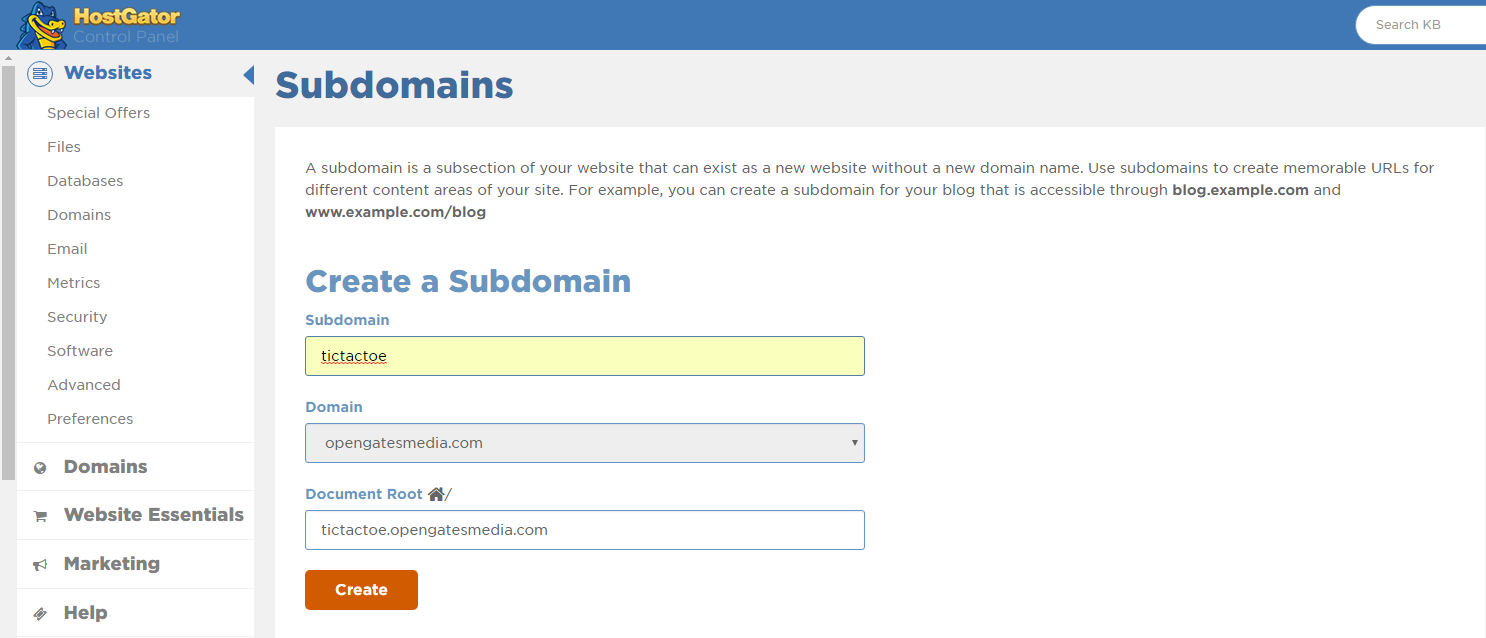
cPanel Subdomain Form

On the following page, enter the name of your subdomain in the Subdomain field. For example, if I wanted to host a Tic-Tac-Toe game, I could enter “tictactoe” as my subdomain.

When you’re done, click Create. You’ll see the Document Root field automatically populate with a folder that will contain the subdomain’s files on the web server. In my case, this default location is “tictactoe.opengatesmedia.com”.

Step 3: Upload the game files to your website

Now that the game is built and has a destination, you’re ready to upload the files to your website. We’ll do this with an FTP Client. If you’ve never used one before, this tutorial will use FileZilla. You can download it here.

Step 3a: Connect the FTP Client to the web server

By default in FileZilla’s interface, the folder hierarchy displayed on the left corresponds to the contents of your computer. The hierarchy on the right corresponds to the folders and files on the web server, provided you’re connected to one. Let’s do this now.

Near the top of FileZilla’s interface, you’ll see a Host, Username, and Password field. Enter your domain name in the Host field. For me, this is opengatesmedia.com. Don’t include “http://” or “https://”. The username and password are the same as you would use to login to cPanel in a web browser. Once you’ve entered this information, click Quickconnect. You should now see the folders on the web server displayed on the right.
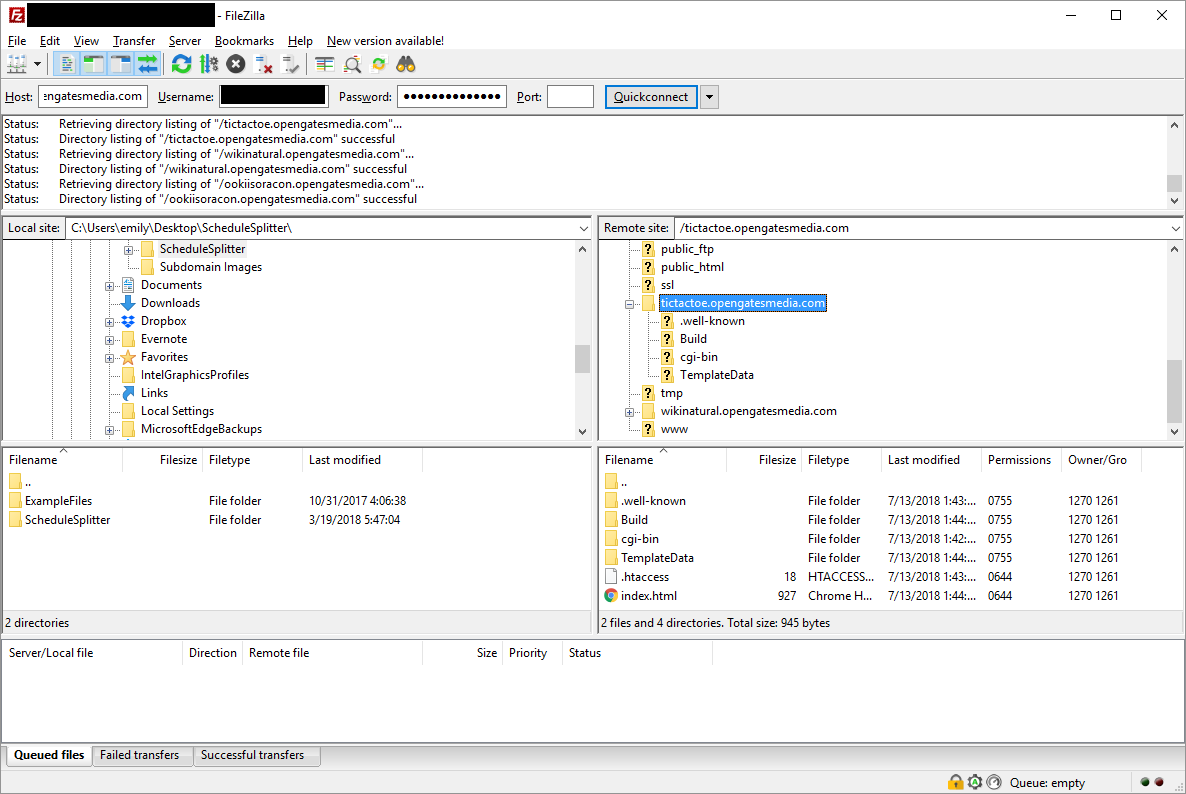
FileZilla Interface

Step 3b: Copy the files to the subdomain folder

The subdomain’s files will be located in the folder specified in the Document Root field when you set up your subdomain. If you didn’t change the default location, this will be a folder in the root directory with the name <yoursubdomain>.<yourdomain>.com. Mine, for example, is called “tictactoe.opengatesmedia.com”. Inside this folder, you’ll find two sub-folders and a .htaccess file. Add your game’s index.html file and the other generated folders to this folder. In FileZilla’s interface, you can do this by navigating to the files’ location on your computer on the left and dragging them to the subdomain’s folder on the right to copy them to the server. You can also open a separate file browser window on your computer and drag-and-drop them to the subdomain folder from there.

Once the files have finished copying, navigate to your subdomain in a web browser. For me, that’s tictactoe.opengatesmedia.com. If you get a 404 Not Found error, you may need to wait a few minutes to a couple hours for HostGator to finish setting up your subdomain. When everything’s up and running, you should be able to see and play your game!
Update

Burst! – Burst got many new features these past couple weeks. We recently had the game reviewed (see 2 hr 32 minutes into the video) by a group of developers on Twitch, and I’m slowly working through the user interface and information problems they uncovered. I added some icons to the top of the screen to visually show where the beats are perfectly in sync with the song. Players can now play their own music and beat maps within Burst. I added an announcer to the game. And now I’m fixing some screen resolution problems. Coming sometime soon, I have to put everything into AssetBundles because I only found out about those recently, and it’s becoming a problem that I’m not using them. With the number of assets Burst has, that could be tedious.

Extra Life – Last weekend, I finished editing an article I started writing about… a year ago. Wow. Anyway, I sent that to the Extra Life Community editor, and it’s in the pipeline. You’ll just have to wait and see which article it is. 🙂 I’m hoping to write more for this blog and for Extra Life in the coming weeks. We’ll see how that goes.

The Twelfth Hour – I’m about halfway through editing Chapter 10. It’s been a slog, but I’m currently working on the largest continuous section in the book (~6,000 words), and it’s going much smoother than the sections that were a third that size. It’s one of my favorite scenes, so it makes sense it’s a little more polished. Oddly though, everytime I revise it, something about it changes drastically, and this pass is no exception. Maybe I’ll still make up the time I’ve lost though.