Update

The Twelfth Hour

I finished Chapter 10 of 12! Then, I started reviewing Chapter 11. Finishing it will be crazy! All the plotlines and character arcs are smashing together into a glorious finale! …Or maybe into nonsense. Who knows? The due date for having the book beta reader ready is December 12, fitting considering the story ends on that day. If you’d like to get in on it, contact me!

Burst!

My brother got married last weekend, and we had family over. That consumed a lot of time, and what time I had left I decided to spend on The Twelfth Hour. I did, however, manage to finish fixing the screen resolution problems in Burst!, add Prima Nocta’s “Stones and Metal” to the playable songs, and fix some random problems with the gameplay before then. While I still have more to tweak, the CEO Josh showed the new build to kids at the company’s video game design camp last week. They were addicted to it! You can check out the latest build for yourself on the Add A Tudez Entertainment Twitch channel here. Next up, I’ll implement Asset Bundles, which, from what I’ve read, sound like my kind of tedious.

Website Stuff

I took some time this weekend to research and implement a new HTML retrieval solution to resurrect WikiNatural, and finally, a year later, the 3D web browser for Wikipedia has returned! You can play around with it here. I’ll likely write up an article on how I did it for this blog next week. Writing about these little web dev projects gives me an excuse to learn this stuff. πŸ™‚ When I finish implementing Asset Bundles in Burst! and the Song Editor, they will likely become a topic as well. Also, the surprise article I sent to the Extra Life editor has gone through a couple revisions and will release soon.

How to Upload Content to a HostGator Subdomain

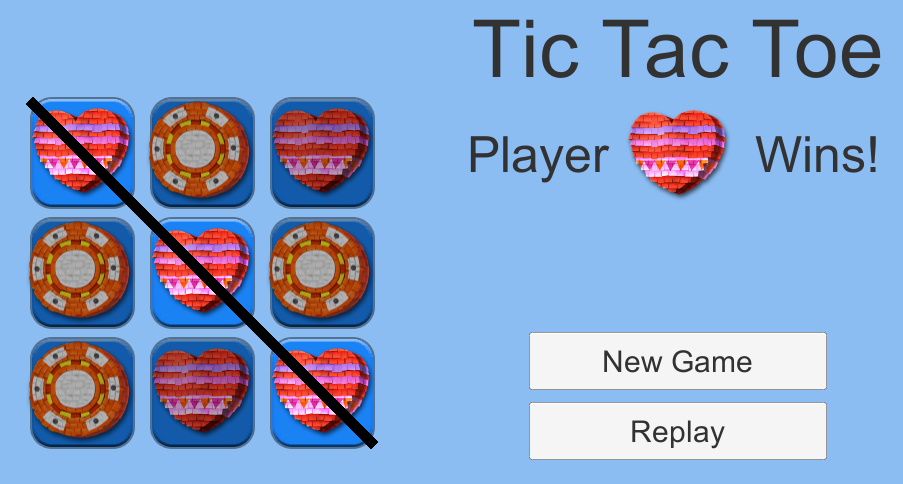
Tic Tac Toe Gameplay Image
Subdomains are subdivisions of a website’s primary domain. In the web address, the name of a subdomain appears before the domain name with a period separating them. For example, Extra Life’s domain is extra-life.orgΒ and the Extra Life Community website is a subdomain of Extra Life, community.extra-life.org. Subdomains are themselves websites. They can host WordPress sites, forums, wikis, custom HTML, games… Pretty much anything the main domain can host, a subdomain can as well.

If you already have a website hosted through HostGator, you can have as many subdomains as you want. How do you create a subdomain though, and how do you upload custom content to it? This guide will walk you through how to host a Unity 3D or RPG Maker MV project on a subdomain of your HostGator-hosted website, but steps 2 and 3 apply to any custom HTML you want to host. If the game stuff doesn’t apply to you, skip to there. Otherwise, read on! This tutorial assumes you are using a Windows machine, but the steps are similar for other platforms.

Step 1: Build your game

If you’d like to host a game you’ve built on a subdomain of your website and you haven’t built the game for the web yet, obviously, you’ll need to do that. πŸ™‚ Below are basic instructions for Unity 2018 and RPG Maker MV.

Unity 2018

In Unity, open the File menu and select Build Settings…
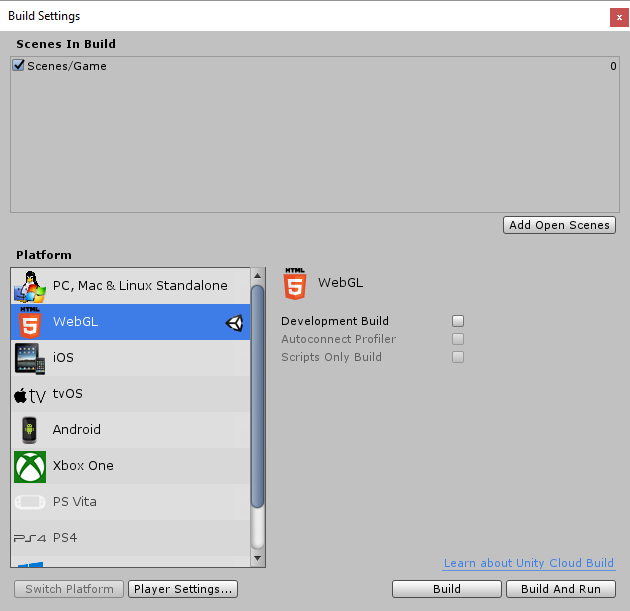
Unity Build Settings

In the following window, check the scenes to include in the build and select WebGL as the Platform. You can find more settings by clicking the Project Settings… button.Β This article on Unity’s website has more information about these settings, the build process, and its products.

When you’re satisfied, click Build. Note that if you don’t have WebGL support installed, you will be prompted to install it. Otherwise, you’ll then select a folder to save the game files in. Unity will build the game and save two folders and an index.html file to your selected location.
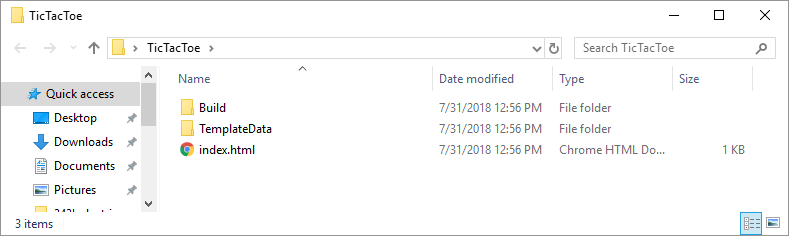
Unity Web Build Products

You can test the game by opening the index.html file in a web browser. If you use Chrome, it typically doesn’t like accessing local files and will likely display an error message. You might want to use Firefox or another browser instead.

RPG Maker MV

In RPG Maker MV, open the File menu and select Deployment…
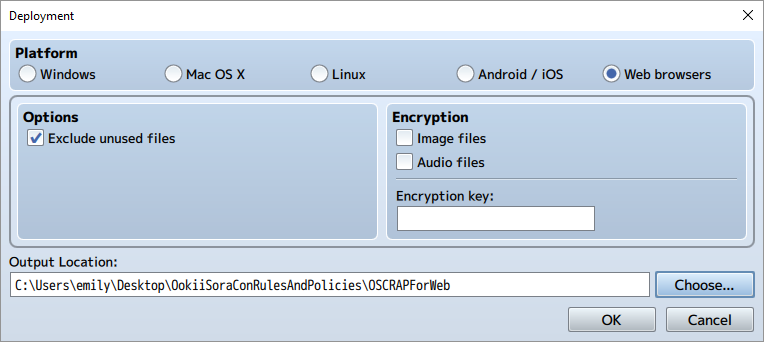
RPG Maker MV Deployment Options

In the following window, check “Web browsers” from the Platform radio buttons and select an Output Folder. I also recommend checking the “Exclude unused files” option. If desired, you can also select to encrypt your Image or Audio files. When you’re done, click OK.

Within the location you selected, RPG Maker will produce an index.html file and several folders of assets. If you’ve added any extra folders to your RPG Maker project, these will also be copied automatically. I, for instance, had a folder where I saved json files produced by the Character Generator and a folder of Photoshop files for custom image assets. Feel free to delete these extra folders if they aren’t required for your game to run.
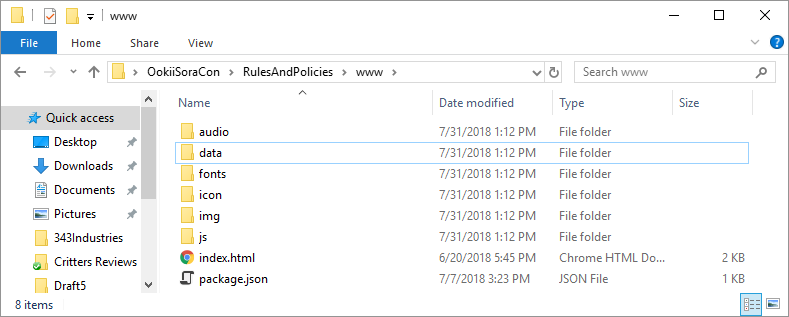
RPG Maker MV Web Build Products

You can test the game by opening the index.html file in a web browser. If you use Chrome, it typically doesn’t like accessing local files and will likely display an error message. You might want to use Firefox or another browser instead.

Step 2: Create a Subdomain

If you don’t have a subdomain for your project already, you’ll need to create one. You can do this within your website’s cPanel.
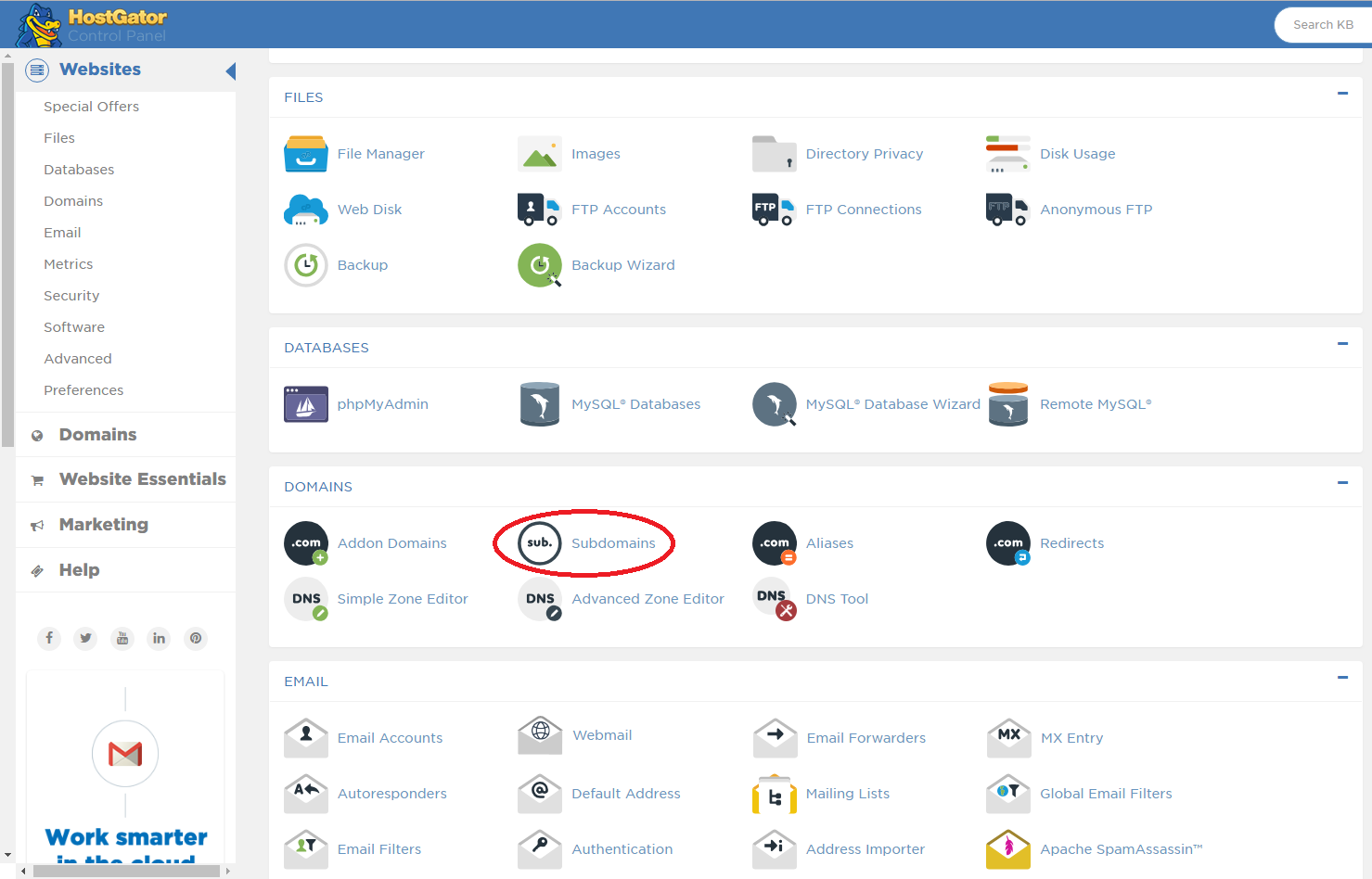
cPanel Subdomains

Step 2a: Login to cPanel

HostGator will have sent you an email with instructions on how to access cPanel when you purchased your domain and hosting service. Since I use shared web hosting, I log in to cPanel by navigating to a web address that looks something like “gator1234.hostgator.com:2083”. Once there, you’ll be prompted for your cPanel username and password. Note that these are separate from your credentials for entering the HostGator Customer Billing Portal or, if your primary domain hosts a WordPress website, your WordPress credentials.

You can find other methods to log in to your cPanel in HostGator’s article on the topic here.

Step 2b: Create a Subdomain

In cPanel, scroll down to the Domains section and click Subdomains.
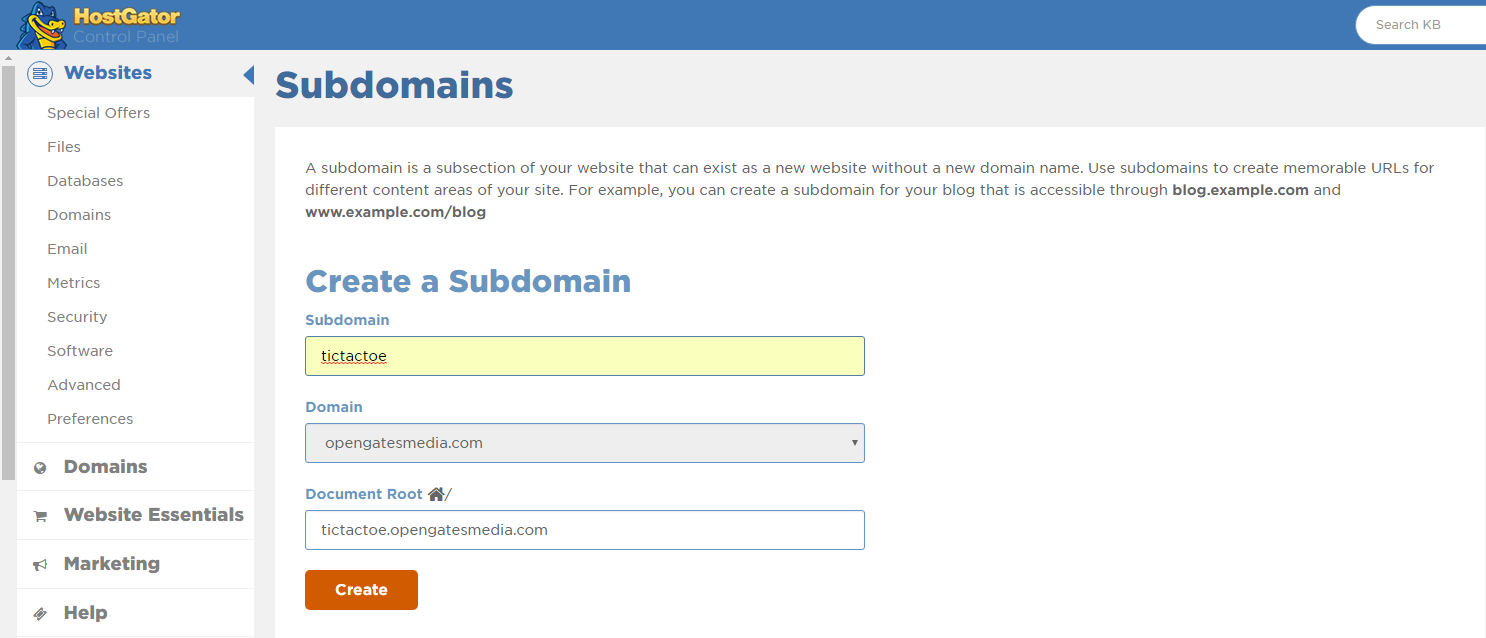
cPanel Subdomain Form

On the following page, enter the name of your subdomain in the Subdomain field. For example, if I wanted to host a Tic-Tac-Toe game, I could enter “tictactoe” as my subdomain.

When you’re done, click Create. You’ll see the Document Root field automatically populate with a folder that will contain the subdomain’s files on the web server. In my case, this default location is “tictactoe.opengatesmedia.com”.

Step 3: Upload the game files to your website

Now that the game is built and has a destination, you’re ready to upload the files to your website. We’ll do this with an FTP Client. If you’ve never used one before, this tutorial will use FileZilla. You can download it here.

Step 3a: Connect the FTP Client to the web server

By default in FileZilla’s interface, the folder hierarchy displayed on the left corresponds to the contents of your computer. The hierarchy on the right corresponds to the folders and files on the web server, provided you’re connected to one. Let’s do this now.

Near the top of FileZilla’s interface, you’ll see a Host, Username, and Password field. Enter your domain name in the Host field. For me, this is opengatesmedia.com. Don’t include “http://” or “https://”. The username and password are the same as you would use to login to cPanel in a web browser. Once you’ve entered this information, click Quickconnect. You should now see the folders on the web server displayed on the right.
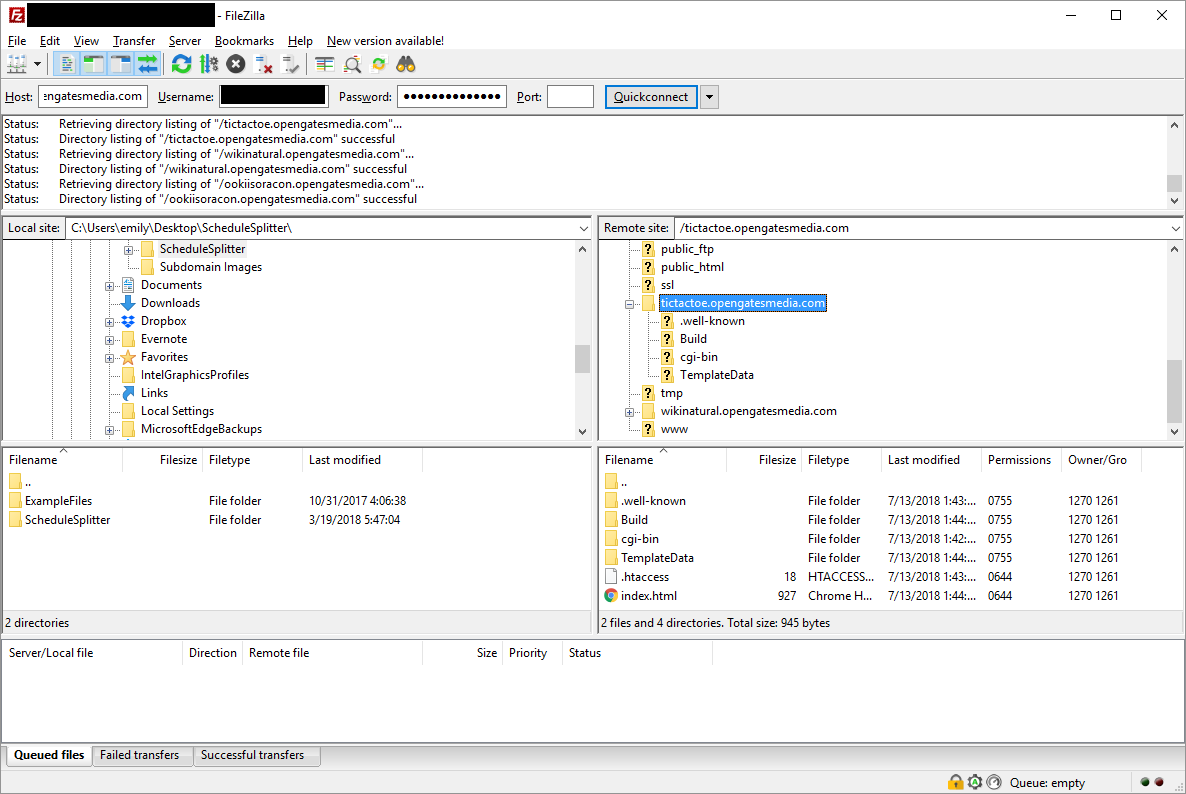
FileZilla Interface

Step 3b: Copy the files to the subdomain folder

The subdomain’s files will be located in the folder specified in the Document Root field when you set up your subdomain. If you didn’t change the default location, this will be a folder in the root directory with the name <yoursubdomain>.<yourdomain>.com. Mine, for example, is called “tictactoe.opengatesmedia.com”. Inside this folder, you’ll find two sub-folders and a .htaccess file. Add your game’s index.html file and the other generated folders to this folder. In FileZilla’s interface, you can do this by navigating to the files’ location on your computer on the left and dragging them to the subdomain’s folder on the right to copy them to the server. You can also open a separate file browser window on your computer and drag-and-drop them to the subdomain folder from there.

Once the files have finished copying, navigate to your subdomain in a web browser. For me, that’s tictactoe.opengatesmedia.com. If you get a 404 Not Found error, you may need to wait a few minutes to a couple hours for HostGator to finish setting up your subdomain. When everything’s up and running, you should be able to see and play your game!
Update

Burst! – Burst got many new features these past couple weeks. We recently had the game reviewed (see 2 hr 32 minutes into the video) by a group of developers on Twitch, and I’m slowly working through the user interface and information problems they uncovered. I added some icons to the top of the screen to visually show where the beats are perfectly in sync with the song. Players can now play their own music and beat maps within Burst. I added an announcer to the game. And now I’m fixing some screen resolution problems. Coming sometime soon, I have to put everything into AssetBundles because I only found out about those recently, and it’s becoming a problem that I’m not using them. With the number of assets Burst has, that could be tedious.

Extra Life – Last weekend, I finished editing an article I started writing about… a year ago. Wow. Anyway, I sent that to the Extra Life Community editor, and it’s in the pipeline. You’ll just have to wait and see which article it is. πŸ™‚ I’m hoping to write more for this blog and for Extra Life in the coming weeks. We’ll see how that goes.

The Twelfth Hour – I’m about halfway through editing Chapter 10. It’s been a slog, but I’m currently working on the largest continuous section in the book (~6,000 words), and it’s going much smoother than the sections that were a third that size. It’s one of my favorite scenes, so it makes sense it’s a little more polished. Oddly though, everytime I revise it, something about it changes drastically, and this pass is no exception. Maybe I’ll still make up the time I’ve lost though.

Breaking Down Burst!

This evening on Twitch, Team KAIZEN demonstrated Burst! from early prototypes to the current version. Toward the end of the video, I add a brand new feature to Burst! in a ten-minute presentation. After that, my brother demonstrates how he makes songs for Burst!, using the latest version of the Song Editor. You can watch the full video on Team KAIZEN’s Twitch channel here.

Update

Website – Last weekend, I bought a web domain and hosting service through HostGator, and now this website exists. I spent a large chunk of the week copying stuff from my old website to this one, adding new content, and changing links. Perhaps the most noteworthy addition is that you can now play OokiiSoraCon Rules and Policies: The Game. I still need to change links on all my social media accounts, but I’ll get there eventually. Transferring everything from one website to the other was time-consuming enough. @.@ I also need to move the WikiNatural page here, but I figure now that I have a hosting service, I don’t really have an excuse for it not functioning. I’d like to fix it first. It feels like a whole world of new possibilities has opened just by buying space for a personal website. I have a place where I can organize all my stuff in a way that makes sense and experiment with php, sql, javascript, and other web stuff! It’s awesome! I should have done this years ago. The transition would have probably been a lot easier, and I’d probably have more web development skills than I do now.

The Twelfth Hour – I’m about a third of the way through editing Chapter 10, a couple days behind. As I suspected I’d do, I’m first completely or partially rewriting each section and then editing them, which lengthens the process. At least I’m not rewriting the entire story arc as I was last time I went through here. This rewriting is more about improving the pace and fitting events together in more natural ways.

Team KAIZEN – I finished work on the Burst! Song Editor and moved on to Burst! itself. I’m taking a break from allowing players to play their own songs in favor of improving the gameplay though. While I was programming the Song Editor, we identified some problems in the game that make testing it difficult. So far, I’ve added a countdown to the beginning of each song and icons in the sky to give players a visual cue for when button presses are perfectly on beat. Unfortunately, development has been slow. At the start of the week, I needed to onboard our latest programmer, which involved updating the Shattered Soul tech demo to a modern version of Unity, ensuring the Google Drive containing the project was functional and in-sync with my most recent changes, and writing instructions for what we’d like changed in it. Additionally, Team KAIZEN started a Twitch channel, and Josh would like me to record development vlogs and programming tutorials to supplement it. I spent a third of my programming time this week experimenting with how to do that efficiently. I’m hoping to have the first video edited by next week.

Weekly Update

OokiiSoraCon – The pop culture convention in Helena happened last weekend! About 400 people attended it over three days, and everyone seemed to enjoy themselves. While we did have a few hiccups behind the scenes, overall, we had a good first year! During opening ceremonies, the convention chair played OokiiSoraCon Rules and Policies: The Game for an audience of about 100 people and voice-acted the dialog with the members of Zapp’s Spaceship of Love, the convention’s guests of honor. Everyone found it hilarious, and we received compliments on the game throughout the weekend. Once the board and the convention’s volunteers recover and we start holding meetings again, I’ll bring up the possibility of sharing it online for all to see.

The Twelfth Hour – Despite how busy I’ve been (including volunteering over 50 hours in four days during the course of the convention O.o), I managed to finish editing Chapter 9 and make a plan for editing Chapter 10. I’m still on schedule! While Chapter 8 and Chapter 9 were fairly easy to edit in this draft, however, I have a feeling Chapter 10 and Chapter 11 are going to be a pain. They are longer than I would like, and a crap-ton of stuff happens in them. I do know how to fix a couple problems though. Two scenes don’t feel quite right emotionally, and past experience has shown that whenever that happens, the problem is always that the protagonist isn’t angry enough. And indeed, that is the problem. In another two scenes, I realized I needed the sidekick in the scene, but I had the love interest instead. That’s a new and bizarre mistake.

Tic Tac Toe – The job I applied for a few weeks ago came back to life the moment I got home from Montana. The CEO invited me to finish my Tic Tac Toe game and apply for two new openings for temporary positions in the company. In the space of two days, I finished the project and then had a two-hour-long interview. @.@ I’ll find out next week if I got the job or not, but regardless, I’ll have an even better project to add to my portfolio. It was also nice to hear from someone with much more experience than me that I actually have decent UI/UX design skills and coding style. After spending my entire career working mostly alone, making up coding standards, figuring out how to use design code and interface as I go, and hardly ever having getting any feedback on that stuff, that’s pretty validating. O.O

Team KAIZEN – After OokiiSoraCon, I made a trip to Great Falls to visit the owners of Team KAIZEN. We met a new member of our team and discussed what his role would be, we talked about some exciting opportunities that have come up in the wake of E3, and we talked about Burst! and Shattered Soul. Hint: If the job I applied for doesn’t come to fruition you just might see more articles and videos from me. πŸ™‚ I also gave the author of Winds of Eshra the notes I had on her book. In other Burst!-related news, while this job opportunity and OokiiSoraCon continue to slow progress on it, I did implement Undo and Redo functions in the Burst! Song Editor as well as the ability for users to swap between PlayStation and keyboard control schemes and icons.

Spider-Man: Into the Spider-Verse

Facebook informed me that Marvel will release a CGI movie in December this year. The art style certainly looks unique, and it has potential to have a storyline/content outside what’s typically seen in children’s/family CGI movies. This I’ll definitely have to check out. πŸ™‚

The Perfect Khan

The Perfect Khan, the new adult-oriented CGI movie I heard about through John Swasey at Sakuracon, has a website now! It doesn’t look like the movie’s available yet, but you can watch the trailer.

Weekly Update

OokiiSoraCon Rules and Policies: The Game – I finished programming the OokiiSoraCon video game. We may make some cosmetic changes before the convention, but I don’t plan on adding anything else content-wise… this year at least. πŸ™‚

Writing – I finished editing Chapter 8 of The Twelfth Hour, and I’m currently about 1/3 of the way through Chapter 9. Despite taking a break to write the plot synopsis and all the other things I’ve been doing the past few weeks, I’m still a few days ahead of schedule. Nothing exciting happened at MisCon aside from buying a couple new books, including a J.A. Pitts novel. I also finished editing the novel Winds of Eshra and rereading its prequel Messenger of Eshra. I’ll likely meet with the author after OokiiSoraCon to talk about the books and my notes.

Unity Development – A couple days before MisCon three weeks ago, I applied for a random Unity developer position at a video game studio that creates games mostly for phones and tablets in a remote work environment. The CEO invited me to go through their interview process, which was much more time consuming than I expected. It involved creating a Tic Tac Toe game in Unity in several steps and sending the code for review after each step. While I had fun doing it, created something that I could add to my portfolio, and learned some new things about Unity, the position I was applying for was filled before I finished the interview process and now I’m three weeks behind on Burst!. The good news is that with the OokiiSoraCon game finished, Winds of Eshra edited, and my latest attempt at job hunting ended, I’m back to working on nothing except Burst! and The Twelfth Hour. Well, there’s still OokiiSoraCon itself June 22-24, but I hope I can catch up on Burst! as the summer continues.

Team KAIZEN also got some exciting news last week. Burst! will be pitched at the Big Indie Pitch on Wednesday during E3! If we “win” the contest, we’ll get access to help with marketing the game to a larger audience. Even if we don’t win, my contact at Extra Life would like to write about the game for the Extra Life Community website.

And that’s what happened in the past three weeks…